If you’ve ever been the last car in the school parking lot, you know the struggle is real. During my years teaching upper elementary, I was guilty of this more times than I care to admit – and it was all because I hadn’t mastered teacher productivity during the school day.
As teachers, work-life balance can feel impossible with everything piled onto your plate. But here’s what I learned: finding teacher productivity strategies that actually work can help you reclaim those precious evening hours.
Here are 5 tips that transformed my teacher productivity when I was in the classroom. Tip #3 is my absolute favorite and something that will help you plan with ease all year long.
#1 Use Lists For All the Things
Teachers wear so many hats, and each comes with its own to-do list. Faculty meetings, assemblies, IEPs, student transportation changes, committees – things come up constantly throughout the day. If you’re anything like me, you probably can’t remember it all without writing it down.
Getting my thoughts, needs, and tasks down on paper was a game-changer for my teacher productivity. It helped me be much more intentional with my time instead of scrambling to remember everything.
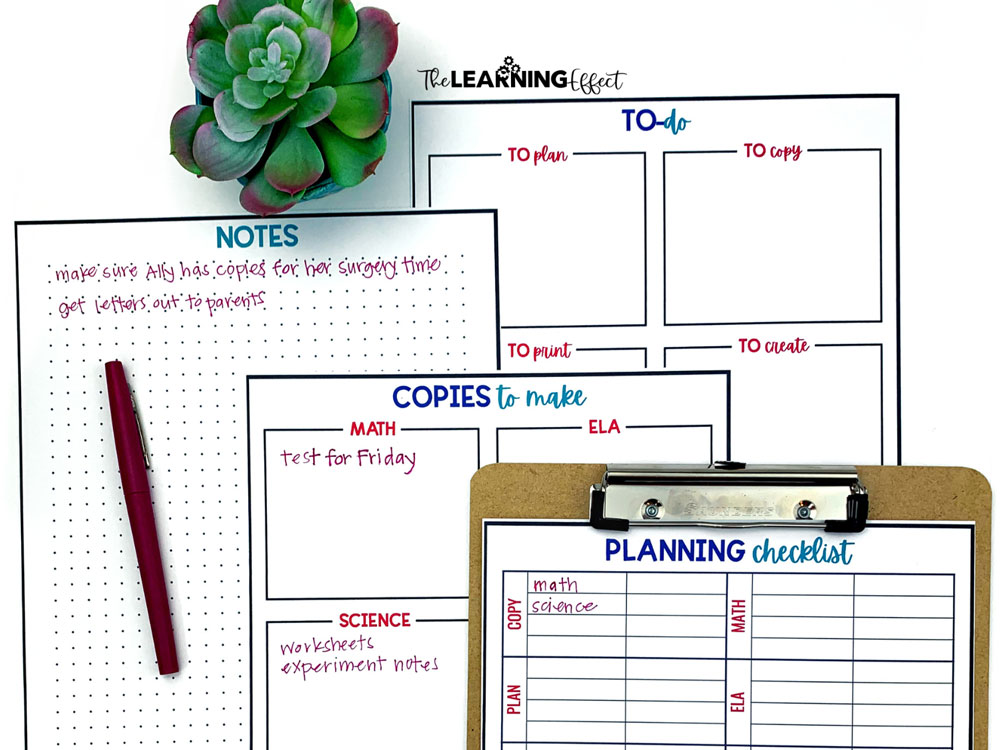
When I was planning each week, I had a master checklist of what always needed to be done: spelling word list, homework sheet, update class website, math exit slips, interactive notebook sheets – you know the drill.
I created this checklist, laminated it, and would cross things off as I completed each task. I kept a separate running to-do list nearby for anything extra that popped up during the day.
For example, I kept separate lists for:
- Daily tasks: Update behavior chart, prep tomorrow’s materials, check parent emails
- Weekly tasks: Create spelling list, prep math centers, plan science experiments
- Monthly tasks: Update bulletin boards, send newsletters, organize classroom library
This list-making strategy becomes even more powerful when you have systems that support it all year long.
#2 Create Templates to Boost Teacher Productivity
When you can create templates, do it! This was one of my biggest teacher productivity wins because templates can easily be modified and reused year after year. During my teaching years, I had templates for tracking student work, science vocabulary quizzes, math assessments, parent communication, and so much more.
Using templates took the extra brain power out of what I needed to create. I didn’t have to think about formatting, layout, or starting from scratch every single time.

Here are some templates that saved me countless hours:
- Weekly newsletter template with consistent sections and formatting
- Parent conference forms with standard questions and space for notes
- Math quiz templates with the same structure but different problems
- Science vocabulary sheets that I could customize for each unit
- Substitute plans template with classroom procedures and emergency contacts
The beauty of templates is that once you create them, you’re done with the hard work. You just plug in new content and you’re ready to go. Templates are fantastic time-savers, especially when they’re part of a comprehensive planning system that works together.
#3 Create and Use a Curriculum Map
To save time on planning throughout the school year, create a curriculum map. This was hands-down my favorite teacher productivity strategy because it eliminated so much decision fatigue during weekly planning.
A curriculum map increases teacher productivity because you’ll always know what you’re teaching next when it’s time to plan. Your plans can always change at any point, but having that roadmap gives you a clear direction and saves precious mental energy.
When I had my curriculum mapped out, I could spend my planning time focusing on how to teach the content rather than scrambling to figure out what to teach next. It was like having a GPS for my entire school year.
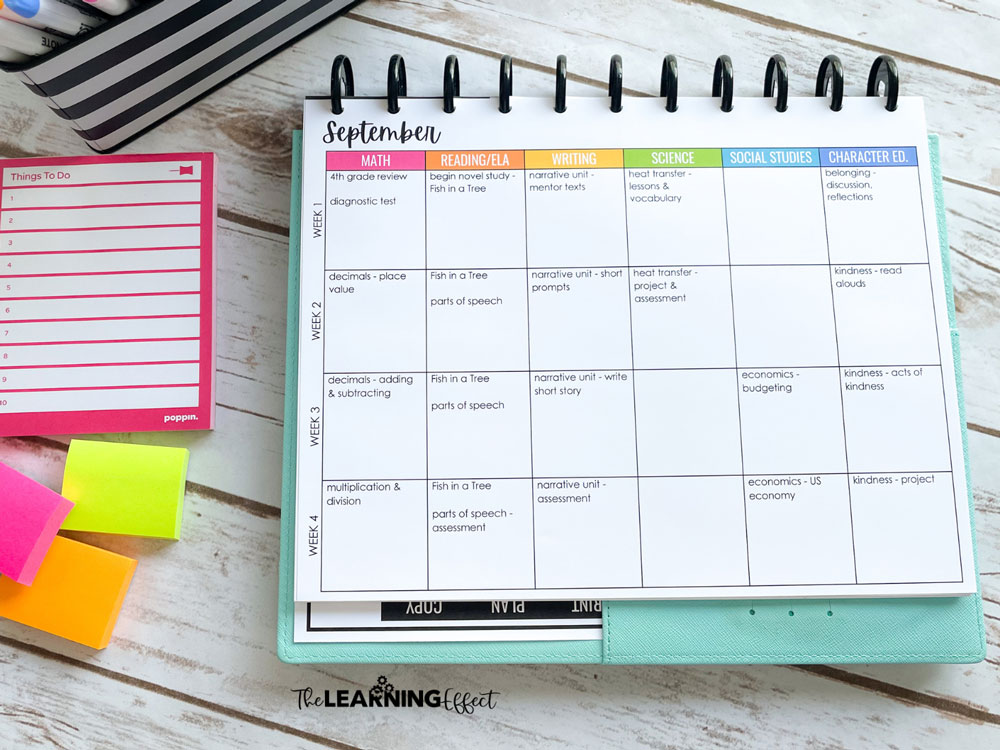
Here’s what curriculum mapping did for my teacher productivity:
- Eliminated last-minute panic about what to cover next
- Helped me prep materials in advance since I knew what was coming
- Ensured I’d cover everything before state testing
- Made substitute planning easier because I could see the bigger picture
- Reduced Sunday night planning stress significantly
But here’s what I learned: curriculum mapping works best when it’s part of a complete planning system – not just a standalone tool. The time you invest upfront in creating your curriculum map will pay dividends all year long, especially when it’s supported by other systems that work together seamlessly.
#4 Batch Prep for Maximum Teacher Productivity
I’m sure each week, you find yourself repeating the same tasks when it comes to planning lessons, prepping resources for centers, and making copies. By batching similar tasks together, you’ll dramatically boost your teacher productivity.
Instead of bouncing between different types of work throughout the week, I learned to group similar activities and tackle them all at once. This eliminated the mental switching that happens when you jump from task to task.

Here’s how I batched my weekly prep work:
- Sundays: Laminating and cutting materials (rare that I needed to do this, but if I did, this is when it happened)
- Mondays: Gather weekly materials
- Tuesdays: All copying for the entire week (no more daily trips to the copy machine!)
- Wednesdays: Planning for next week
- Thursdays: Grading – everything that was graded could go home in Friday folders
- Fridays: Creating digital resources and updating online platforms
The key is to pick one day for each type of task and stick to it. For example, doing all your copying in one session means you’re not wasting time walking back and forth to the copy machine or waiting in line multiple times throughout the week.
This approach felt weird at first, but once I got into the rhythm, it became second nature. Plus, there’s something satisfying about checking off an entire category of tasks in one go!
#5 Set a Timer
You’ll work more efficiently if you know your time is limited to complete a task. This simple teacher productivity hack completely changed how I approached my work time.
If I know a task will realistically take me 30 minutes to complete, I set a timer and get to work. Knowing that timer is ticking away keeps me laser-focused with a singular purpose – no more getting distracted by other things on my desk or checking email ‘real quick.’

Here’s why timers work so well for teacher productivity:
- Creates urgency that prevents perfectionism from taking over
- Eliminates distractions because you’re racing against the clock
- Helps you estimate time more accurately for future planning
- Prevents tasks from expanding to fill whatever time you have available
- Builds momentum as you complete tasks quickly
I used this strategy for everything from grading papers to creating bulletin boards to responding to parent emails. Sometimes I’d even challenge myself to beat my previous time, which made mundane tasks feel more like a game.
The timer method works because it forces you to focus on ‘good enough’ instead of perfect – and honestly, good enough is usually exactly what you need to keep moving forward productively.
These five strategies can transform your teacher productivity, but here’s what I’ve learned after years of helping upper elementary teachers: individual tips work best when they’re part of a complete, sustainable system.
During my years in the classroom, I discovered that having all these pieces work together – the lists, templates, curriculum maps, batching routines, and time management strategies – created something much more powerful than any single productivity hack.
You know that feeling when you’ve tried all the tips and tricks, but you’re still starting from scratch every August? That’s because you need more than individual strategies – you need systems that support each other and carry you through the entire school year.
That’s exactly why I created the Ready, Set, Teach! Planning System – a comprehensive approach that brings all these teacher productivity elements together, plus the planning tools, routines, and strategies you need to feel confident and prepared all year long.

Ready to stop reinventing the wheel every school year and build systems that actually stick? Check out the Ready, Set, Teach! Planning System and see how good it feels when planning actually works for you, not against you.